Google Search Console MCP: read your Search Console data in Claude, ChatGPT, Cursor, or Codex.
One hosted endpoint. Read-only Google scope, no Google Cloud project, no service account to manage.
Requirements for connection.
A clean separation between what is required and what is not.
You need:
- A Seopod account
- At least one domain added to your workspace
- Access to the Google Search Console property for that domain
You do NOT need:
- A Google Cloud project
- An OAuth client ID or client secret
- A service account JSON key
Connect your Search Console.
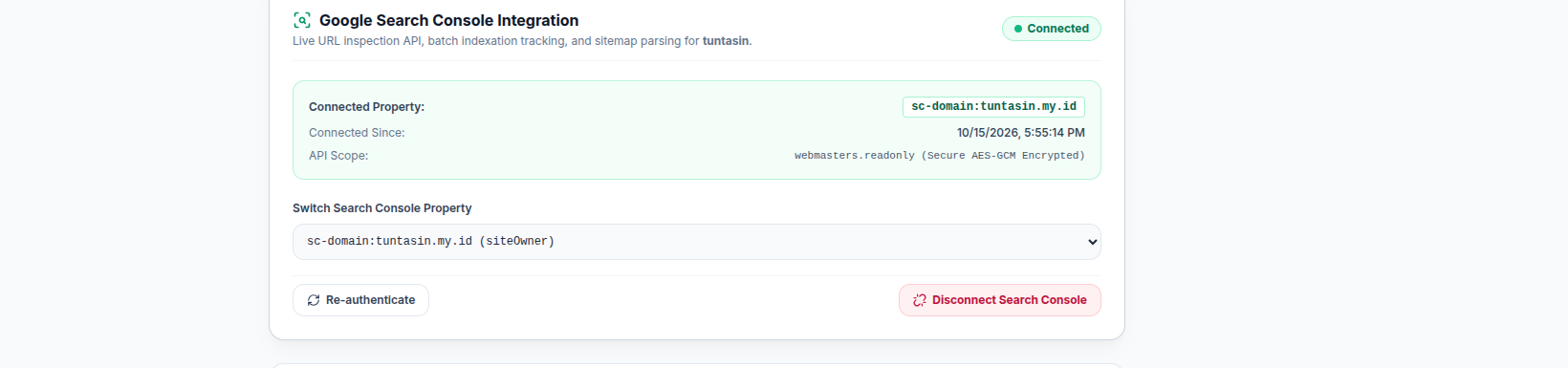
Open Settings in the sidebar and find the Google Search Console card. Click Connect, then sign in with the same Google account you use for Search Console.
Google will ask for permission. Seopod only asks to read your Search Console data, so it can never change your settings or submit sitemaps. Approve it, then pick your site from the dropdown.
That is it. Your site is connected.
Create an MCP API key.
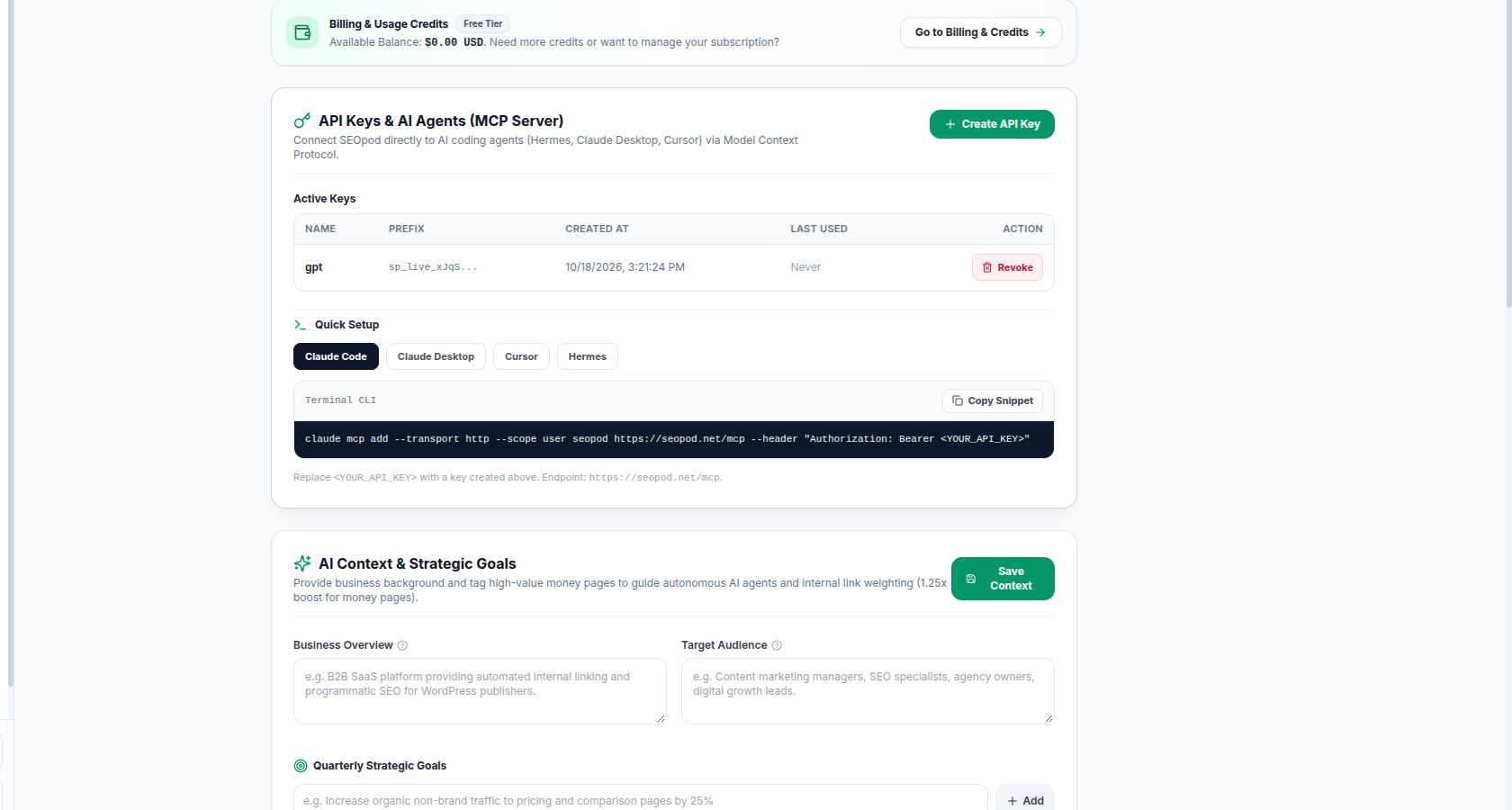
In the same Settings page, find the API Keys & AI Agents (MCP Server) card. Click Create API Key and give it a name you will recognise, such as the agent you are wiring up. The full key is shown once, at creation. Copy it then; the list view only ever shows the prefix.
Keys use the prefix sp_live_. Treat one like a password: it can read every domain in your workspace.
Paste one prompt. Your agent connects itself.
No config files, no JSON to edit. Paste this into your agent with the key from Step 2 in place of the placeholder, and it wires up the connection and confirms it worked.
Add this MCP server to your config and confirm it connected:

Name: seopod
URL: https://seopod.net/mcp
Header: Authorization: Bearer YOUR_SP_LIVE_KEY

Then call seopod_whoami to confirm the connection works, and tell me which of my domains have Search Console connected.
If the agent asks whether to allow a new tool or server, say yes. If it cannot add servers itself, add https://seopod.net/mcp as a custom connector in that app's settings and paste your key when the consent screen asks for it.
Works with
Claude Code · Cursor · Codex CLI · Windsurf · Hermes · Claude Desktop · ChatGPT
Run your first real query.
Search Console data does not appear the moment you connect. Pull it first, then ask a question about it.
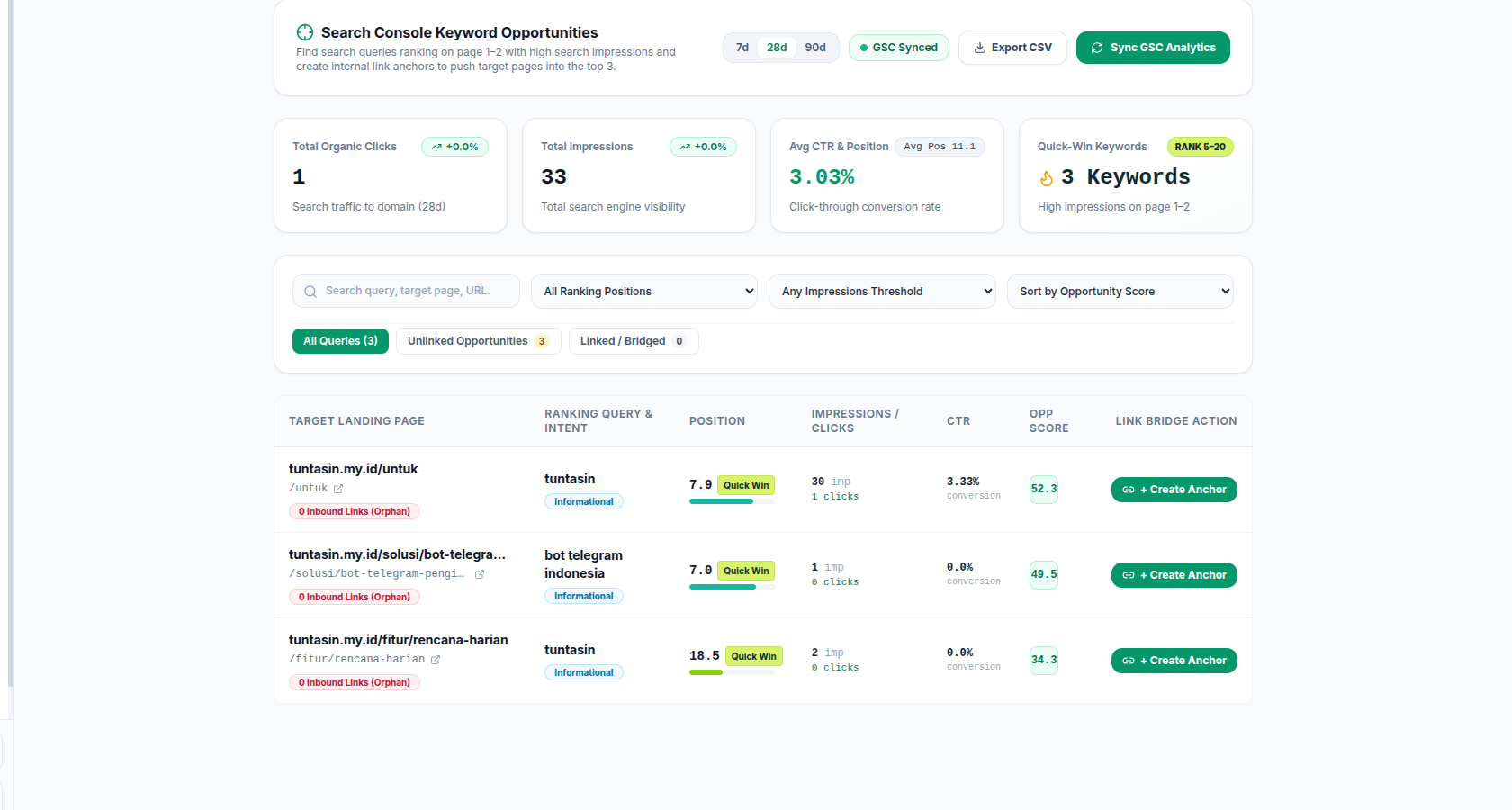
Sync my Search Console data for this domain, then show me the striking-distance queries in positions 5 to 20.The agent calls seopod_sync_gsc to pull performance rows, then seopod_get_gsc_matrix to surface queries sitting in the 5.0 to 20.0 band with a scored opportunity value. Each row names the landing page that should carry the fix, and any page with zero inbound internal links is flagged as an orphan.
From there, the agent can stage an internal link through seopod_stage_link_mutation. Nothing reaches a published page without your approval: every write is backed up, hash-checked, read back, and reversible in one click.
For the full workflow, from striking-distance query to placed internal link, see the GSC Opportunity Matrix page.
Ask a real question. Get a real answer.
Your agent has your Search Console data. These are the questions worth asking first. Every prompt below runs on data you already synced, so none of them consume credits.
Which of my pages are stuck on page two?
Sync my Search Console data for the last 28 days, then show me the queries sitting in positions 5 to 20 ranked by opportunity score.Returns each query with its position, impressions, clicks, and the landing page that should carry the fix. Pages with no inbound internal links get flagged as orphans.
Where am I getting impressions but no clicks?
Show me my queries with high impressions and low CTR, worst first, and tell me which page each one lands on.Surfaces the queries where your title and meta description are not earning the click. Usually the fastest ranking win available, because the page already ranks.
What should I fix first?
From my synced Search Console data, give me the top 5 changes ranked by opportunity score, and explain each one in a single sentence.A prioritised list with reasoning, not a raw data dump. Useful when you have limited time and need to pick one thing.
Is this page actually indexed?
Inspect https://yourdomain.com/your-page and tell me if it is indexed, what canonical it declares, and whether anything is blocking it.Returns index state, HTTP status, response time, title, canonical, and meta robots. Catches accidental noindex and canonical mismatches before they cost you a ranking.
Which of my pages compete with each other?
Find any query where more than one of my pages ranks, show me every competing URL with its position, and tell me which one Google currently favours.Keyword cannibalisation. Two pages splitting the same query means neither ranks as well as one would. This is invisible in the Search Console UI, which reports one row per query and page.
What am I ranking for that I never targeted?
List queries where I get impressions on a page that does not obviously cover that topic, sorted by impressions, so I can decide what to write next.Content gaps you already have demand for. Google is showing your page for something it does not properly answer, which makes these the easiest pages to expand.
The four Search Console tools behind these prompts
seopod_get_gsc_matrix striking-distance opportunities in the 5.0 to 20.0 band, scored, with orphan flags. seopod_get_gsc_queries query rows filtered by query substring or landing page, up to 100 per call. seopod_sync_gsc pulls fresh Search Console data for a 7 to 90 day window. seopod_inspect_url index state and on-page signals for a single URL, with an optional live probe.
All four read data you already synced and cost $0.00.
Frequently asked questions.
Details on permissions, scopes, data flow, and agent compatibility.
What am I actually granting Seopod?
Exactly one scope: https://www.googleapis.com/auth/webmasters.readonly. Read-only Search Console. No writes to your properties, no Gmail, no Drive, no Analytics. The scope string is visible in the OAuth consent screen, so you can check it yourself before approving.
Can the agent write to my site?
The read path is Search Console. The write path is WordPress only, for internal link deployment. There is no write path for Webflow, Shopify, or a custom stack, and nothing is ever inserted without you approving the exact diff.
I manage many client properties. Does this scale?
One Search Console property per domain. If you run forty client sites, that is forty domains in your workspace, each connected once. There is no bulk onboarding and no seats or roles layer, so plan for the setup time rather than assuming it is automatic.
Does Seopod modify anything inside my Search Console account?
No. The scope is read-only, which means Seopod cannot submit sitemaps, request indexing, change property settings, or alter any data Google holds for you.
How recent is the Search Console data?
It matches Google's standard reporting window. Data appears after you trigger a sync, and the sync window is configurable from 7 to 90 days.
Do I need a Google Cloud project?
No. Seopod holds the OAuth client. You authorize through a browser, and the refresh token is stored encrypted. There is no Cloud project, no client secret, and no service account JSON to manage.
Are the Search Console tools metered?
No. The Search Console matrix and indexing tools are $0.00 on the published rate card. Credits apply to provider-backed research and to link generation, not to reading data you already synced.
Which agents are supported?
Claude Code, Claude Desktop, Claude web connectors, Cursor, Codex CLI, ChatGPT in Developer Mode, Hermes, and Windsurf. Any client that speaks MCP over streamable HTTP with a Bearer header or OAuth 2.0 PKCE will work.
Stop exporting Search Console to a spreadsheet. Ask your agent instead.
Every export you run today is a snapshot you read once and throw away. Connect Search Console once and your agent reads the same numbers directly, every time you ask, without a download in between. Google keeps 16 months of history, and none of it is doing anything for you until something reads it.
Free forever for Search Console. No credit card.